Protection WHM/Cpanel from Email SPAM and Spoofing

Email is a rather traditional communication technology (invented in 1971 by Ray Tomlinson) and is full of "problems," one of which is spam and spoofing. SPAM and Spoofing are very troublesome for anyone; if you use software as a service like Google Workspace or MS Office 365, these problems are somewhat alleviated in your efforts to combat SPAM and Spoofing. Meanwhile, for those of you using Infrastructure as a Service email services like Cpanel, Plesk, Zimbra, and other native email servers, SPAM and spoofing can be quite troublesome.
SPAM is a malicious method of attacking email that works by sending a massive number of emails. Spoofing is a method of attacking an email account by sending emails impersonating you or your domain. For example, you are not a staff member of the White House (the Presidential Office in the USA), but you receive an email claiming to be from the original domain, @whitehouse.gov. I chose @whitehouse.gov because many people have impersonated @whitehouse.gov in spoofing, especially in the 2000s. The purpose of SPAM and spoofing is fraud, account takeover, spreading malware and malicious scripts, and so on.
In this article, I will explain the preventive steps to protect against incoming and outgoing spam and spoofing emails for users of the WHM/cPanel platform.
WHM Dashboard
Here are the steps you can take on the WHM Dashboard:
- Log in to the WHM Dashboard via https://YOUR_SERVER_IP:2087
- Backup Exim configuration:
WHM Dashboard > Exim Configuration Manager > Backup > Save on Server > [Run Backup] - Enable Apache SpamAssassin™ Global
WHM Dashboard > Exim Configuration Manager > Basic Editor > Apache SpamAssassin™: Forced Global ON [?] > Check ON - Enable Email Spam Protection for outgoing emails
WHM Dashboard > Exim Configuration Manager > Basic Editor > Apache SpamAssassin™: Forced Global ON [?] > Scan outgoing messages for spam and reject based on the Apache SpamAssassin™ internal spam_score setting [?] - Enable “nobody” from sending mail
WHM Dashboard > Server Configuration > Tweak Settings > Mail > Prevent “nobody” from sending mail [?] > [On] - Enable SMTP Restrictions
WHM Dashboard > Security Center > SMTP Restrictions > [Enable] to activate - Outgoing Spam Protection. Hold/Reject Outgoing Mail if there is an anomaly in SPAM delivery.
WHM Dashboard > Tweak Settings > “Select the action for the system to take on an email account when it detects a potential spammer” > Hold outgoing mail or Reject outgoing mail. Recommended setting: Hold outgoing mail
Cpanel Dashboard
Meanwhile, on the Cpanel Dashboard, the following settings can be configured:
- Log in to the Cpanel Dashboard via https://YOUR_SERVER_IP:2083
- Cpanel Dashboard > Email > Spam Filters > Enable Process New Emails and Mark them as Spam > Select Additional Configurations (For Advanced Users) > Select Show Additional Configuration > Calculated Spam Score Settings > Configure Calculated Spam Score > Select Add New “Score” Item
- You can change the Spam Threshold Score to 7 or 8
See the capture below.
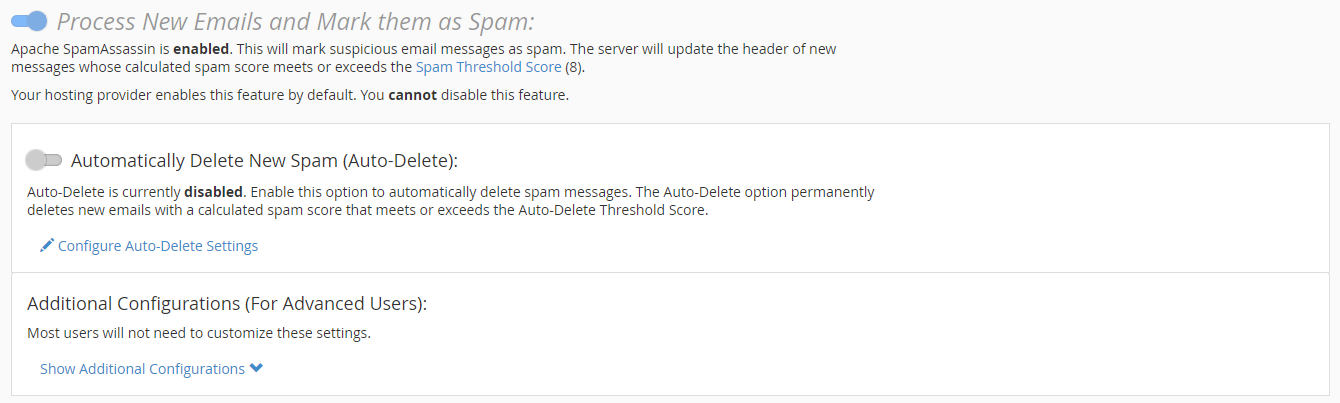
In the Add New "Score" Item section, add the following standard rules and then select Update Scoring Option after adding the SpamFilter rule:
- MISSING_FROM 1
- MISSING_DATE 1.5
- MISSING_HEADERS 1.5
- PDS_FROM_2_EMAILS 1
- EMPTY_MESSAGE 2.5
- FREEMAIL_FORGED_REPLYTO 2.5
- URI_OBFU_DOM 1
- URI_OBFU_PROTO 1
- URI_OBFU_TLD 1
- SPF_FAIL 7
- SPF_HELO_FAIL 7
- SPF_HELO_SOFTFAIL 1.5
- DKIM_INVALID 0.1
Note:
Managing email based on infrastructure As a service such as on Cpanel, Plesk, Zimbra platforms, or other native email servers is not easy, you need to prepare dedicated human resources to monitor your email services, maintain the OS and services, monitor email traffic to prevent outgoing and incoming SPAM activities, monitor the health of IP and domain, whitelist and blacklist domains, delist from RBL, and so on.
My suggestion is, if you do not have the human resources or a dedicated person in charge to handle that, it is better to use software as a service (SaaS) email services such as MS O365 Online, Google Suite, Alibaba Mail, and other SaaS-based email services, which require less maintenance and upkeep.